Network
The alternate restore location can be a UNC network share (for example \\server\share).
When the alternate restore location is a complete network share path, a Network Credentials button is enabled next to it. The button opens the Network Credentials dialog to manage the credentials the agent uses to write to that share.
Network Credentials dialog
The Network Credentials dialog tests, saves, and removes the credentials the agent uses to connect to a protected network path.
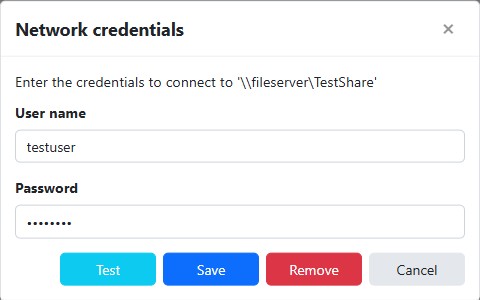
The dialog validates the entered credentials before contacting the agent:
- The user name is required, must be 256 characters or fewer, and must be in the format
user_nameordomain_name\user_name(at most one backslash, and it can't end with a backslash). - The password is optional and must be 256 characters or fewer.
Test
Validates the entered credentials and then tests connecting to the network path. On success, "Network connection successful" is displayed; otherwise the error is shown in the validation summary.
Save
Adds the credentials, or updates them if they already exist, and displays "Credentials saved successfully."
Warning
Saving overwrites the password already stored for this network path.
Remove
Removes the stored credentials after a confirmation prompt, and displays "Credentials removed successfully." The Remove button is disabled when no credentials are currently stored for the network path.
Warning
Removing deletes the credentials for this network path for all other backup jobs that may still use it.
Cancel
Closes the dialog without saving or removing any credentials.
Tip
Windows credentials are retrieved and saved in the context of the "Run as" user configured in the backup job's settings, so it's recommended to configure the "Run as" user before browsing the network and saving network credentials.
Note
Network credentials are saved scoped to the "Run as" user and are re-used by other jobs that run in the context of that user for each specific network path.
Note
When the dialog appears automatically while you are expanding a network path, saving credentials continues that expansion and lists the path's contents. When you open the dialog explicitly with the Credentials button and then add, update, or remove credentials, the network path is collapsed and is re-queried the next time you expand it, so the credential change takes effect on the next browse.